Universal Mobile | Computer: Blogger Tips and Tricks
Latest Updates :
Powered by Blogger.

Latest Post

Showing posts with label Blogger Tips and Tricks. Show all posts

How To Add Links On Blogger To Follow Your Facebook Account

Written By Universal TechWorld on Friday, November 25, 2016 | 11:24 PM

How To Add Links On Blogger To Follow Your Facebook Account

How To Add Links On Blogger To Follow Your Facebook Account

Google's Blogger blogging platform lets you customize your blog by adding widgets to your profile. These widgets range from calendars and other tools, to profile badges for your social networks. If you want to add a Facebook profile badge to your Blogger profile, you can do so directly through the Facebook badges website.

Log in to your Facebook account.

Go to Facebook.com/badges. Click the type of badge that you want to add to your Blogger account.

Click the "+ Blogger" button. Type your Blogger log-in credentials in the spaces provided and click the "Sign in" button to sign into your account.

Type a title for the Facebook badge widget in the space provided. Click the "Add Widget" button to add the Facebook link to your Blogger page.

Popup Window For Blogger – Popup Window Code

Written By Universal TechWorld on Tuesday, February 3, 2015 | 9:16 AM

You might notice in some websites that a popup window opens suddenly without the knowledge of you which leads to other websites and they do it for some promotional purpose.
It’s easy to add popup window for blogger and adding popup window helps in increasing page views of your blog and you can help visitors to know useful links within your site and other external sites.

How to create a popup window for Blogger

  1. Login to your blogger  account
  2. Go to Dashboard >> layout and click “add a gadget” from sidebar or footer
  3. Open HTML/JavaScript gadget
  4. Add the following script in HTML/JavaScript content area and click save

1<script type="text/javascript">
2document.body.onclick= function(){
3window.open('http://universaltechworld.blogspot.com/', 'poppage', 'toolbars=0, scrollbars=1, location=0, statusbars=0, menubars=0, resizable=1, width=950, height=650, left = 300, top = 50');
4}</script>
Note:
  1. Make sure to change the http://universaltechworld.blogspot.com/ URL
  2. Customize the width and height of the popup window like you wish
Now a popup window opens pointing to that page when users click somewhere on your blog.
Check out the popup window live in action here.

Nepal Government To Monitor .NP Domain Registration

Written By Universal TechWorld on Monday, February 2, 2015 | 6:16 PM

Nepal Government To Monitor .NP Domain Registration

Government of Nepal is going to monitor on Nepal's Country domain .np registration. It was previously authorized to a Private company, Mercantile Communications Pvt. ltd. Still Mercantile Communications Pvt is maintaining on .np domains registration.
It is available free of cost because Mercantile, which is maintaining primary name service for NP is providing this service free of cost. Due to providing free of cost, Government has suspected misuse of these domains . So, Government sector is planning to charge for .np registration in the future. 
Mercantile is providing domains on first-come-first service basis with their terms and conditions. It is categorized  in two ways: official domain and personal domain registration. Personal Domain name should be selected based only on his/her name as mentioned in citizenship certificate. For A company/organisation, they can only  select domain names based on their company/organization's name, product's name, service's name and brand name. Domains can be registered only under the following secondary NP domains: COM.NP, ORG.NP, EDU.NP NET.NP, GOV.NP and MIL.NP.  To register these domains first we have check availability on register.com.np, which is totally under control of mercantile pvt. ltd. then with online application at mos.com.np, we have to submit one application letter with citizenship (for personal domain) or company/organization's letter head (for official domain).


In case of .com, The right to use a domain name is delegated by domain name registrars which are accredited by the Internet Corporation for Assigned Names and Numbers  (ICANN), the organization charged with overseeing the name and number systems of the Internet. In addition to ICANN, each top-level domain (TLD) is maintained and serviced technically by an administrative organization operating a registry. A registry is responsible for maintaining the database of names registered within the TLD it administers. The registry receives registration information from each domain name registrar authorized to assign names in the corresponding TLD and publishes the information using a special service, the whois protocol.
A domain name is an identification label that defines a realm of administrative autonomy, authority, or control on the Internet, based on the Domain Name System (DNS).
Domain names are used in various networking contexts and applcation-specific naming and addressing purposes. They are organized in subordinate levels (subdomains) of the DNS root domain, which is nameless. The first-level set of domain names are the top-level domains (TLDs), including the generic top-level domains (gTLDs), such as the prominent domains com, net and org, and the country code top-level domains (ccTLDs). Below these top-level domains in the DNS hierarchy are the second-level and third-level domain names that are typically open for reservation by end-users that wish to connect local area networks to the Internet, run web sites, or create other publicly accessible Internet resources. The registration of these domain names is usually administered by domain name registrars who sell their services to the public.
Individual Internet host computers use domain names as host identifiers, or hostnames. Hostnames are the leaf labels in the domain name system usually without further subordinate domain name space. Hostnames appear as a component in Uniform Resource Locators (URLs) for Internet resources such as web sites (e.g., nirmal.com.np).


 Every domain name has a suffix that indicates which top level domain (TLD) it belongs to. There are only a limited number of such domains. For example:


# gov - Government agencies
# edu - Educational institutions
# org - Organizations (nonprofit)
# mil - Military
# com - commercial business
# net - Network organizations
# ca - Canada
# th - Thailand
source Nepal Government To Monitor .NP Domain Registration

What Is .np Domain?

What Is .np Domain?

It is available free of cost because Mercantile, which is maintaining primary name service for NP is providing this service free of cost and will remain so as long as Mercantile continues providing it free. MOS-NP doesn't add any cost for the services it provides regarding the domain registrations.
Domain registrations under .NP ccTLD is free of cost.
Domains are registered on a first-come-first-serve basis but terms and conditions apply.
Domains can be registered only under the following secondary NP domains: COM.NP, ORG.NP, EDU.NP NET.NP, GOV.NP and MIL.NP
Foreign companies are required to have an official presence in Nepal as a joint venture, partnership, agent, or a licensee in order to qualify to register a domain. Official documents to prove the presence will have to be submitted with the application.
It may take at least 2 working day to get your domain/s registered or modified. Though it may take longer sometimes depending on the number of pending requests.
Check the availability of the domain/s
Submit the registration template from the site www.mos.com.np with all the required information.Your service provider company can be consulted for technical information in the template.
Review the information for accuracy before submitting.
Information for .np Domain Registration

Read the "Terms and Conditions" carefully.
Required documents for .np registration:

For Official Request


  • A application letter written in the company/organization's letter-head pad signed by authorized officer.
  • A copy of company/organization registration certificate issued by the respective government bodies must be dropped to the Hostmaster at Mercantile communications, Durbar Marg. Kathmandu.
  • Online form (admin/ technical contacts and valid name servers). (Administrator's contract adress in the online form should be from the company owner)

NOTE:- A company/organisation only can select domain names based on its company/organization's name, product's name, service's name and brand name.

For Personal Request


  • A application request letter.
  • A copy of the applicant's citizenship certificate must be dropped to the Hostmaster at Mercantile communications, Durbar Marg. Kathmandu in order to verify the authenticity of the applicant as only Nepalese citizens are entitled to register personal domains.
  • Online form (Administrator's contract adress in the online form should be from the domain owner)

NOTE:- Personal Domain name should be selected based only on his/her name as mentioned in citizenship certificate.

Terms and Conditions
(Policy For Domain Name Registration Under NP CCTLD) The applicant who wants to register a domain name under NP CCTLD must read and agree to the policy, stated below:

  • The registration of a domain name is a listing service. The listing service of names within the .NP delegated name space is undertaken on a First Come - First Served basis (except in cases where it infringes upon a registered tradenames and the conditions listed below), moderated by the .NP domain's administration policies as determined by the delegated authority (MOS-NP). The registration function does not trade in, or license in any way any entity (including the listing requesting entity) to trade in the requested name.
  • If a party claims that a domain name already registered violates their registered tradename, or an obvious derivation of their registered company name, MOS-NP reserves the right to transfer the domain to the claiming party provided that they had registered tradename, trademarks or registered company name at least one year before the registration date of the domain name in question registered with MOS-NP. In this, and all other matters, decision of a court of law with proper jurisdiction in Nepal, if so sought, will be final.
  • Any claim to trade name or copyright under .NP domain name is considered valid ONLY if it is registered with an official trade-name/copyright/patent office in Nepal. Acceptance of the listing entry by the delegated authority confers no rights to the applicant regarding the llegitimacy or otherwise of the association of the name with the applicant, nor does it confer to the applicant any other rights associated with ownership of the name, or any rights to its use.
  • No adjudication is made within the registration function as to whether the applicant has a legitimate right to a name. The applicant in lodging the request for a name informs the delegated authority that they are asserting a claimed right to a name. In the case of conflicting name requests between an applicant and an existing listing held by the delegated authority, the matter will be referred to clause number (2) & (4). If they do not apply, it is left to the parties concerned (applicant and listed entity) to resolve such matters, and report to the delegated authority if the resolution includes a change of registration details.
  • Domain names may be removed from the registration function's records upon receipt of written advice indicating that the list entry should be removed from the registry, on condition that the original applicant (or corporate entity) submits the advice to the delegated authority.
  • All registration information will be considered as information within the public domain, and will be accessible using the Internet as the publication vehicle. No provision is made concerning acceptance of information under any imposed condition of confidentiality or non-disclosure. Domain registration is available only in the standard structure i.e. com.np, org.np, edu.np, net.np, gov.np and the domain name must be an obvious derivation of the official name of the applicant body, OR one of its registered trademarks. (e.g., starTrek.com.np will not be registered for an applicant with title "StarOffice Limited".)
  • The party requesting registration of this name certifies that, to her/his knowledge, the use of this name does not violate trademark or other statues.
  • Registering a domain name does not confer any legal rights to that name and any disputes between parties over the rights to use a particular name are to be settled between the contending parties using normal legal methods. Domain registration/modification under .NP is done free** of cost.
  • Foreign corporations/Multi-national companies can only register domains that suggest their company/trade names and cannot register other generic domains.
  • MOS-NP has neither the resources nor the legal obligation to screen requested Domain Names to determine if the use of a Domain Name by an Applicant may infringe upon the right(s) of a third party.


Consequently, as an express condition and material inducement of the grant of an applicant's ("Applicant") request to register a Domain Name, Applicant represents, agrees and warrants as follows:
Applicant's statements in the application are true and Applicant has the right to use the Domain Name as requested in the Application; Applicant has a bona fide intention to use the Domain Name on a regular basis on the Internet; The use or registration of the Domain Name by Applicant does not interfere with or infringe the right of any third party in any jurisdiction with respect to trademark, service mark, trade name, company name or any other intellectual property right; Applicant is not seeking to use the Domain Name for any unlawful purpose, including, without limitation, tortuous interference with contract or prospective business advantage, unfair competition, injuring the reputation of another, or for the purpose of confusing or misleading a person, whether natural or incorporated. Applicant's statements in the application are true and Applicant has the right to use the Domain Name as requested in the Application.
MOS-NP WILL NOT BE LIABLE FOR ANY LOSS OF USE, INTERRUPTION OF BUSINESS, OR ANY INDIRECT, SPECIAL, INCIDENTAL, OR CONSEQUENTIAL DAMAGES OF ANY KIND (INCLUDING LOST PROFITS). REGARDLESS OF THE FORM OF ACTION, WHETHER IN CONTRACT, TORT (INCLUDING NEGLIGENCE), OR OTHERWISE, EVEN IF MOS-NP HAS BEEN ADVISED OF THE POSSIBILITY OF SUCH DAMAGES.
** It is available free of cost because Mercantile, which is maintaining primary name service for NP is providing this service free of cost and will remain so as long as Mercantile continues providing it free. MOS-NP doesn't add any cost for the services it provides regarding the domain registrations. Please direct any correspondence regarding domain names to hostmaster@mos.com.np

Mailing address:
The Hostmaster
NP ccTLD Registration Services
MERCANTILE COMMUNICATIONS PVT. LTD.
P. O. Box 876
Durbarmarg, Kathmandu, NEPAL
Tel: +977-1-4240920, +977-1-4220773
Fax: +977-1-4221493
source What Is .np Domain?

Top 7 Big Players That Rules The Blogging Niche

Top 7 Big Players That Rules The Blogging Niche

One of the good things the internet has brought about is the creation of million dollar business for individuals; it is an avenue that can quickly make you from level zero to hero. It created a lot of opportunities and the sharp ones were able to tap into it. One of the prominent multi-million dollar businesses on the internet is Blogging.
Blogging is fun, but tasking. The starting point requires a lot of hard work and commitment, but the end point is so much rewarding, here are some of the bloggers that has pass through fire, and has now become the big players of in the blogging sphere.

Darren Rowse

One of the fathers of blogging, he runs a very big blogging niche. The CEO of problogger.net, he teaches practical system on blogging to newbie and even professionals in the business. Some of the techniques he created that worked his blogging success includes; list posting and traffic funnels. He also runs a niche marketing blog he called Digital Photography School.

Pat Flynn

This is the father of passive income strategy in the online sphere; he often teaches online his system to online marketers. He later extended to pro blogging, his last report shows 40k as his gross earnings per month. Some of the niche Pat explores includes; product creation, niche blog, iPhone apps, affiliate marketing etc.
He is the CEO of smartpassiveincome.com.

Seth Godin

This is a man that posts a few hundred words article but feels like a few thousand.  He gets to the core of an issue without a vain repetition whereas expressing his great mind ideas. Meet him at sethgodin.typepad.com.

SEOMoz

Rand Fishkin is the CEO of SEOMoz, his blog is one of the best SEO blogs online. His niche teaches basically on how to optimize your page for the search engine. He has also gone as far as developing a number of tools that could help you achieve that.
His address line is seomoz.org/blog.

Hongkiat Lim

His blog is currently a Google Page Rank 6 site; he is a designer, developer and loves Apple to the core. More of the resource you get on his blog is basically on web design. He also offers tutorials on blog management. He is now a big player in the blogging sphere.

Ileane Smith

She is a blogger, and a friend to all. One thing I learned from Ileane is that blogging is about connection. She is as old as my grand mum, but she treats you like a friend. Visit any blog, big, medium, small, you will find Ilean. She teaches blogging tips to newbies and professionals on her portal Basic Blog Tips.

Adrienne Smith

She is one the mama of blogging I am talking about. She loves dog; you will see that through her Facebook timeline. She teaches of blogging, writing, and marketing tips on her blog. She is open to anybody, and loves people that connect well. Her blog (www.adriennesmith.net) is very inspiring and I follow her on Twitter.
These are some of the five giants in the blogging sphere, they were dedicated to the job, focused in assignment, and I have a lot to learn from them. Nimral is also a great blogger. He has been outstanding in his freelance web development job over the years, and does well by sharing his techniques and discoveries to the large Australian audience and the world at large.
source Top 7 Big Players That Rules The Blogging Niche

Tips To Make New Sales Out Of Older Blogs

Tips To Make New Sales Out Of Older Blogs

The most essential feature of blogging is updating. Bloggers endeavor not leave a single moment for writing blogs. The main motive of blogging is to cover all the latest happenings. Business Blogging is written to make the people aware about the activities of the organization, new launches, policies, discounts and much more. But here is an interesting research that old blogging can also be used for making new sales.
Here are some useful tips to utilize the old blogging for achieving new sales targets:


Transform into the form of an e book

The e book is the latest trend of online literature. You want to maintain a library you can transform it into the form of an ebook. Some people know the value and hard work of the writer behind every word. They can maintain the previous blogs in the form of Ebook but the past blogs should not be rejected on full of errors. This tip can work only if the data os blogs is like ancient ornaments of case and the value of such ornaments remain precious like its look.

Convenience of the reader

The responsibility of the manufacturer does not finish until the product does not reach at the stock of the retailer. In the same manner creating an ebook does not mean the end of the job. The ebook should be in easily download format. Pdf is accepted by all the compute systems.  The easy download and reading is the first key to strike the sales decision of the reader.

Active passage

The data should be in the form of active passage instead of passive data. The content manager should not forget the final target that is the sale of the product or service. The data should motivate the reader to  read the data and purchase the product. The  sales team should also monitor the sales of the company.

Communication information

The data manager must add the contact information like emails for further communication. If you ask for feedback while providing an email id this indirect sales effort can make the conversion with triumph. The next function of the conversion can be performed by the website. So the final destination current blogs should also be capable  to meet the needs and interests of the reader and potential buyer.

Limit the social sharing

Social websites like Facebook, Twitter and others are a good source for making new clients while presenting the old blogs again and again. This tool can work twice or thrice. Don’t make it a stable effort. The excessive repetition of the same data at social sites can reduce the interest of readers. They would make a fix perception in the absence of creativity and even they can stop recommending the data to others.

The right publication page or site

The right page for publication or website is also a very essential factor. There are some particular websites which like to have ancient books. This is the right medium to grab the target readers and potential buyers.
source Tips To Make New Sales Out Of Older Blogs

12 Checklists for Website Usability

12 Checklists for Website Usability

A good website design can be the major attraction in selling products and gaining attention of customers. It should be designed in such a way so as to attract customers and compels them to revisit. But every website is different. There are some things that all great sites have in common. Here's a checklist to help you make your website great.
Digestible Layout: Your viewers should be able to easily identify the structure and layout of the site. This is especially important for the homepage.


Easy to read Text: It doesn't matter how well written the website's content is written, if it's hard to read, you'll lose traffic. Make sure that the text contrasts well with the background, that it's large enough, and spaced well enough to be easy to read. Your font shouldn't be unusually ornate or fancy, either (Wingdings is a really, really bad choice).

No spelling or grammatical mistakes: Mistakes and spelling and grammar can put off visitors, be sure to check for them using text editing software or online tools. ritin' leik diz aint profeshunal, ya 'no wat i mene?

Prominent Logo : The logo should be easy to find, usually at the top left or center of the page. Clicking on it should take the user to the homepage of the website.

Company information easy to reach: People visiting your site for the first time will want to know who you are and what you do. Make it easy for them to find out. Also include contact information.

Important content is above the “fold”: The “fold” is that imaginary line where your content is cut off at the bottom of the screen. Anything that user must see should be above that, because you really can't rely on the user scrolling (it's so much work!).

Styles stay consistent: Viewers should be able to tell that they're on your site just by the style. Keep a color and font theme. Don't decorate one page with roses and another with skulls, you'll confuse your viewers.

Emphasis isn't over used: Don't try to draw attention to everything with bright colors, bold fonts and flashing text. If it's all like that, anything that written in normal black text will end up getting all the attention.

Main navigation area is easy to find and use: The navigation bar should be easy to find from every page in the website. If there are multiple navigation areas, make sure that their difference is clear. The number of buttons should be around or below seven, and they should have concise, easy to understand labels.

Page titles are useful: This is important for sites that need good search engine ranking. Titles should be unique and descriptive. Make sure that it makes sense and isn't jammed full of keywords, or you'll lose potential visitors from search engines.

Site loads fairly quickly: It's important for your site to not be too heavy. If users have to wait to for the site to load, they may just leave the site. It's also important that flash and other plug-ins load reasonably fast. After all, no one likes waiting.

Site views correctly on all browsers: Make sure your site shows up right on the main browsers, like Chrome, Firefox, Safari, Opera, and, for those misguided, confused people, Internet Explorer. Also make sure it looks good when the browser window is re-sized.

Following this checklist won't make your site the next Google or Facebook, but if you follow these rules, you'll have a site that will earn visitors and keep them. It'll help your site generate traffic, and will go a long ways in making it successful.
source 12 Checklists for Website Usability

Top Seven Biggest Mistakes A Logo Designer Can Make

Top Seven Biggest Mistakes A Logo Designer Can Make
Logo designing has become one of the most worthwhile calling options for so many people.  Mostly those who have a creative and artistic proclivity inside themselves, this field is the best suit. Nowadays a the demand of graphic designing is rising at fast rate and so millions of people are choosing it as their career option that in turn raises the competition in the market.  Once getting settled in this sector one does not need to look back anymore although setting down is a big challenge indeed.
Immense hard work and devotion, creativity and intense power of imagination, these are the main keys behind the success of a logo designer.  Other than that keen knowledge about logo designing is also very important. In short a good log designer has to perfect in both theory and practical.  But most people fail to make their hold in this profession due to some mistakes. Actually there are some slip-ups that look so simple and correctable but that hamper a log designer’s career a lot. Let us have a look at that

1.      Copied Concept:

Designing is all about creation of innovation and more innovative a web designer is, more the customers he or she will gain. Since there are millions of designers available in the market with millions of designs it is not so easy to find out a copied design. But one must remember that yet the world is huge but not unreachable.  This is a common mistake done by many logo designers.  Copying others’ logos for having idea is not bad or a crime but the ultimate call should be the own product of the designer himself. This is one of the main reasons for which the logo designers loose customers.

2.      Appalling Redden Mishmash:

 Most of the times the logo designers feel that Colorful logos will attract customers the best but this is not spot on all the time. Whenever designing a logo, the designer at very first should care for the requirement of the client and the purpose for which the logo is placed for designing. If that is not fulfilled no matter how colorful and vibrant the logo looks, it will not be selected.

3.      Recompense:

In many cases it is found that the designers do not ask for advance payment and so get nothing for their work if the client comes out as a scam.

 4.      On time submission:

 So long logo designing is just a passion, payment, deadline do not matter that much. But moments someone chooses it at profession maintain deadline is very important and it makes a very good will of the designer n front of the clients.

5.      Poor Typography:

 Typography has a very commendable effect on logo designing although many designers do not pay so much attention in that and this is a frequent mistake. A good typography can make a logo only one of its kinds in the crowd and uniqueness is the first thing the customers demand for.

 6.      Too much notions:

A simple but attractive logo helps the clients to understand the purpose easily. Putting so many thoughts in one makes it clumsy.

 7.      Mismatch with the subject:

 Many designers often make this mistake that though they make a good and attractive logo but that does not match the subject. It is the prior task of the designers to get the subject properly and then design.
source Top Seven Biggest Mistakes A Logo Designer Can Make

Tips on Making the Most from Guest Posting

Tips on Making the Most from Guest Posting

When it comes to guest posting there are a lot of questions. Why write guest posts? Why accept guest posts? What can guest posting do for me? How do I get started? What should I watch out for? How can I make the best of guest posts and guest posting? Well, I will attempt to answer all your guest posting questions as clearly and simply as possible.
First of all, what is guest posting? Well, guest posting is very simple. It is an article written by someone outside of the blog owner that has something (hopefully) to do with the blog. This article is usually free for the blogger to use. The blog owner allows guest posting for many reasons, which I will go into detail about in a moment. However there are many reasons for people to offer guest posts to bloggers. Some of those reasons people want to offer this valuable service for free is:
·         Guest posting gets you exposure. Many smaller bloggers try to guest post on bigger blogs to get more exposure for their own site. Getting your name out there and allowing readers a chance to see your writing is very valuable and well worth the time and effort of creating the content.
·         Guest posting gets you links. Links are very valuable resources. Many search engines, like Google, use links as an indicator of how valid a blog is. The more real links your blog has the higher you rank in Google’s searches. Real links are different than purchased links, which is why guest posting is such a great way to get links.
·         Guest posting gets you name recognition. Along with exposure to your writing, guest posting also gets your name out there and the name of your blog. The more people see your name the more they will recognize and remember it. You want to market yourself? Then try guest posting.
That answers the question as to why people make guest posts, but it does not answer why blogger allow guest posts on their site. You would think that they would not want to give something away for free, but in reality they are getting just as much back. Here are some reasons that bloggers love guest posts:
·         They get free content. Content that is high quality is also hard to write. A blogger by himself can have a hard time coming up with new posts every day and a guest post can take some of the burden.
·         They have control. When it comes to guest posts, bloggers have the power. They can specify how long a guest post should be, what it should be about, and how it should look. They can even ask for images or links if they would like. Everything is still under their control.
·         They can say no. Speaking of control, bloggers have the right to reject guest posts. Maybe they were off topic, too controversial or they just did not follow the rules. Whatever the case, you can say thanks but no thanks and move on, not harm no foul.
·         They get links. Oftentimes when a blogger guest posts they offer a link to the blog on their blog. That means that the blog that accepts a guest post gets a link on another blog for nothing! That is a great deal.
·         They get different viewpoints. When one writer is the only voice on a blog it can get boring and start to all sound the same. However letting in guest posts is a great way to get different viewpoints and voices on your blog. You also can get new ideas from guest posts that could help your writing.
·         They get paid. Some blogger even get paid for guest posts! I have seen blogs that allow guest posts for a fee of a few dollars or even more. Think about that, people paying to write content for you!
Alright, so now we have answered why people write guest posts and why people allow guest posting on their blog. Now we get into the big picture. What is a guest post? What should it look like? How can you start guest posting? What are the dos and don’ts of guest posting?

Do:

·         Follow the rules. Almost all blogs that allow guest posts have a set of rules you should follow to be considered. Read it and follow the rules. If a blogger wants over 500 words do not give them 300. If they want an image find one for them. If they want headers or bullet points give it to them. Paying a little attention now will drastically increase your chances of getting your article posted.
·         Write original content. You should take the effort to write something original or just do not write at all. If you have to take some facts from another source then be sure to cite it properly and quote it. It does not take much effort to do things right and it can pay off big.
·         Check out the blog before you write. Do not write for a blog without checking it out first. You need to stay on topic and relevant to their audience and the only way to do that is to find out who their audience is first. Find out what the blog topic is and stay within the bounds of that for the best chances of getting published.
·         Write something different. Speaking of checking out the blog, make sure you do not repeat something that has already been written. That does not mean you have to read every post, but if you write on something that was posted a month ago the chances are you will be rejected. Keep your eyes open and be aware of what topics to avoid.
·         Stay on topic. Sometimes you get off topic as you write and that is fine on your own blog. However when you are writing for others you need to stay focused. There are many ways to do that. Make a list of what you want to cover before you start so that you can hit every point. Reread your work as you go along and make sure it flows together and makes sense.

Don’t:

·         Sell yourself. No one wants to read a sales pitch. Let your writing do the talking and leave yourself out of it. Try not to promote anything specific like a product or website to avoid people thinking you have been paid for the promotion.
·         Write sloppy. There is a tendency to slack off when it comes to grammar and spelling on blogs, but writing sloppy could get your post rejected. Instead take the time to look things over and run spell check before you send out your guest post.
·         Copy others. Like I said, no one wants a copied post. Plagiarism and spinning articles is a no go when it comes to guest posts. Sure we all make mistakes sometimes or accidently say the same thing twice, but actively taking someone else’s work is stealing no matter how you phrase it. Be sure to cite properly and attribute quotes when you use them.
·         Write what you feel like. Do not go off and do your own thing. That is what you blog is for. This is the time to concentrate on the needs and topics of the blog you are writing for. Write what is suitable to their audience and blog niche topic. If you can blend your blog’s topic in with it smoothly then great. But if not then concentrate on them and not you.
·         Be controversial. There are a few blogs out there that love controversial discussions like politics and religion, but as a rule most blogger prefer something a little more tame. Do not take sides or pick on a group. Instead take a journalist role and only write from an unbiased perspective.
Guest posting can be a great advantage for your blog. Allowing guest posts can bring in more variety to your blog and also take some of the stress off your shoulders. Writing guest posts can help you to get your name out there and get more links to your blog. All together guest posting is beneficial as long as it is done correctly.
source Tips on Making the Most from Guest Posting

Own a Multi-Author Website? Manage It Easily with a Few Free WordPress Plug-Ins

Own a Multi-Author Website? Manage It Easily with a Few Free WordPress Plug-Ins
Do you have a multi-author website? Then you are, most probably, no new to several difficulties that come up with running it. Apart from synchronizing with multiple contributors, you are burdened with publishing schedules, editorial works and other important work flow.
If you are working on WordPress platform, you are in some luck as several free plug-ins can make the management matter much easier. Sadly enough, many of them are not very useful and you should not try out sub-standard options. Here are our top picks of plug-ins that can help you manage your multi-author website or blog with much of ease.

Advanced Access Manager

With Advanced Access Manager, you can limit user access to both front-end and back-end on WordPress. Not only that, you can define user roles and abilities along with deciding on which authors will have access to pages, posts and customized posts. In addition, the plug-in also lets you promote or demote authors as per your preferences. Furthermore, filtration of admin panel and dashboard widgets is also possible with the help of the plug-in.
The plug-in offers so many benefits that you will wonder what more are in store. How do you like assigning editorial privileges or comment moderation capabilities to a particular author? The plug-in allows you to do that. After the plug-in is activated, you will land on setting page under a menu titled Access Manager. Here you can mention which user roles to be edited and after that, specify the settings like adding or granting privileges as required.
You can assign selective privileges to the users. For example, you can specify that a particular author or a group of contributors can edit unpublished pages but not the published ones. You can also allow the authors to modify the comments for moderation or mark them as spam but delete none of them.

Edit Flow

It features some high-end functions like custom statuses, calendar, editorial comments, custom statuses etc. Calendar lets the website or blog owners skim over the editorial schedules on weekly or monthly basis. You will have a quick glance over what articles are ready for publishing, which have been already published and which ones need to be edited.
Not satisfied with the default post statuses? Well make a shift towards EditFlow’s custom statuses. You can create custom statuses for the posts. Customize a status titled Proofreading if you want a particular post to be reviewed by a sub-editor before it reaches the chief editor and gets approved by the same. Once Proofreading is set as a custom status, the post makes its way from Draft through Proofreading and Pending Review to Published Custom Post Statuses in EditFlow.
Editorial Metadata Settings in EditFlow allow you to group the users under different heads. You can club the tutorial authors in one group. Grouping under different heads facilitates collaboration among the group members. The same feature also enables you to send emails to the editors, authors or whoever else is a part of the publication process.

WP Status Notifier

This plug-in is used to send emails to the editors and authors whenever the status of a certain post is changed. After a post is approved, it notifies the editors or authors via email regarding the change in post status.
You can use the same plug-in to inform the authors if any of their posts is returned to Drafts for further review. Go to the setting page to specify email address of the admin or authors to whom the emails will be sent every time a new write-up is posted for review.

Editorial Calendar

Use this plug-in if you want to have a bird’s eye view of the publishing schedule for a certain time period, say a week or a month. The calendar also allows you to edit the publishing schedule just through ‘drag and drop’ and then rearrangement. In addition, you can also use the calendar for quick edition of the post titles and their attributes as well.
Though the above-stated plug-ins are fairly easy to use, still you might need help of a professional for guidance. Approach a web design company India to install the plug-ins and show you how to use them. Once you learn the use, managing the multi-author website will be a lot easier. Moreover, the plug-ins will also fun up your WordPress experience.
source Own a Multi-Author Website? Manage It Easily with a Few Free WordPress Plug-Ins

Get Rid Of Google Penalty by Removing Unnatural Back Links

Get Rid Of Google Penalty by Removing Unnatural Back Links
As we all know we all were surprised when Google launched their update of Google services aka  panda or penguin. It was released for the webmaster tools and the guidelines of Google for maintaining the Google quality.  They have overcome with Google webmaster tool which detect the unwanted and unnatural back links.

What are the back links?

It is very common thing that many of the SEO content creators negligently put things on www just to highlight their products or services which they put via back linking. These back links are well framed with perfection on different site and different WebPages with higher viewer data base. By doing this they work for their website for gaining more traffic and that divert the audience.
Why this unwanted back links are problematic?
Back links are the most popular for getting good traffic to your site and that comes under SEO strategy.  This traffic helps you to get your products or services on Google’s search engine result page and by the following strategy we get more popularity by attracting audience.
Most of the SEO use black hat methods for creating these back links. Every year, Google updates the rules and regulation and guidance also for maintaining the quality in the internet world and as well as their SERP’s too. In these following lines of update Google has released Penguin and Panda updates which are specially designed to work for tracing all those unwanted and unnecessary back links and forwarded the above mentioned notice to all of the webmasters who all were traced for using this black hat strategy in the back links and their SERP rank is eliminated after that.

How to be free from Google’s penalty?

If you find guilt by Google webmaster tool then it will penalized you and thus expulsion from the SERP ranks. But after you get penalized the first thing is that it is very difficult to get that reputation again and yes but still there is a chance for you.  So it is possible to gaining back that same position but it needs some hints and tricks to step approach forward towards it.
The first main thing that you need to do is, that you should remove all those unwanted links from your site for becoming free from the penalty. There are various technical method are available for removing these links, but initially try something simple things before applying high tech methods.
Some of the strategies are compiled for easy use, but the connection change with the anxiety of problem:
List out all the sites which points to your website: there are many tools that are efficient and smart enough to detect all those unnatural back links. Some of these include, open site explorer from Google webmaster tools from Google, Majestic SEO tools etc. they all provide the details like list of anchor, author, URL, and domain names
Give your best for removing these links: removing link is not at all easy task. Many link removal services sites providing this service, or if you have a password to access over the site then you can do it by yourself. Currently article writing and posting is become a trend, and if you have taken help of those freelancer then you must say them to remove those links on behalf of you.
If website editor, writer or post maker didn’t acknowledge then don’t follow: there are possibilities that you need to pay those whom you have hired for removing those links, editor’s nod for editing of their site. If the post maker doesn’t give you clue then it becomes compulsory for you to don’t follow that service which makes all of these links untraceable by the Google bots when scrutinized for spamming and abnormalities.
Reform your image: when all the information is correct and accurate on your site, everything is new, innovative, creative and interesting then yours site will be definitely accepted and considered reputed website by the Google and will be promoted for good quality content. This is the best time where you can come up with all new images and you can refresh the image of your website.
Form a good reconsideration request mail: after doing all the above mention practices it is the real time to file a reconsideration mail to Google.  Make sure that you keep in the mind that Google are getting thousands of these kind of mail, you make sure that it becomes important to tell them what was wrong from your side, why you came in doubt, what steps were taken to rectify all those mistakes and how could you assure that those mistakes you will never repeat again. Try to apologies, for the implications of unnecessary things. Provide all the report to them of all of the procedure you have gone through for rectifying such issue.
source Get Rid Of Google Penalty by Removing Unnatural Back Links

How to Apply to Google Adsense and Actually Get Approved

Written By Universal TechWorld on Sunday, February 1, 2015 | 8:51 AM

I first applied to Google Adsense back in 2005 or 2006.  Since that time, I have applied and gotten approved many times for related business entities or helping others set up their own Google Adsense accounts.  Each time, my applications have been approved to start using the Google Adsense program, so I feel like I can offer some solid advice on how to make sure you get your own approved account.
Now, if you have been following my blog, you know that I had a bit of a set back with Google Adsense, but I am now actively using Google Adsense as though nothing happened.  The reality is that Google Adsense is the best contextual marketing program on the market with the most advertisers and the highest payouts.  I love the Adsense program and definitely recommend those involved with niche websites to at least get started with Adsense.

Doesn’t Everyone Get Approved?

To be honest, its shocking to hear how many people get declined from Google Adsense when they apply.  I’ve received many emails from readers saying that their applications were declined.  I’ve read complaints on forums or comments about the difficulty of getting approved with Google.
I personally have never experienced this.  But I’ve also been very careful when I apply.  Below you will find the process I have used to apply and get approved to Google Adsense.

Steps to Getting Approved

In a nutshell, there are 5 steps to applying and getting approved to the Adsense affiliate program.
1. Create a Valuable and Good Looking Site
Google wants to know that you have an valuable resource!  So, in order to increase your chances of approval, you need to create original, articulate, and useful content!  This should go without saying for any website; however, I can guarantee you that people have applied to Google Adsense with autoblogs, or copied articles from EzineArticles.com.  Then they wonder why they didn’t get approved.
My advice is to have at least 10 well-written articles of 500 words or more each on your site before applying.  In addition, I would have a great “About Page”, “Contact” page, and a “Privacy Policy” page.  The privacy policy needs toinclude this information supplied by Google here.  You can find a free privacy policy generator that I have used right here.
In addition, you are more likely to get approved if you have a great looking theme or site.  I recommend using a premium theme (if using WordPress) if possible.  You can still use a free theme, but do your best to find one that looks high quality.
Finally, to give your site an extra boost on the “look” score, I recommend having a logo designed.  You can do it yourself, or you can hire someone on Fiverr.com if you are cheap (like me).  For $5 you can take a generic theme and make it look much nicer with a custom logo.
Overall, make sure that your site is fully developed with content, logo, layout changes BEFORE you submit the site to Google.
Quick Tip!  Remember, you CANNOT apply to Google Adsense using a site that has ever been used for Google Adsense before.
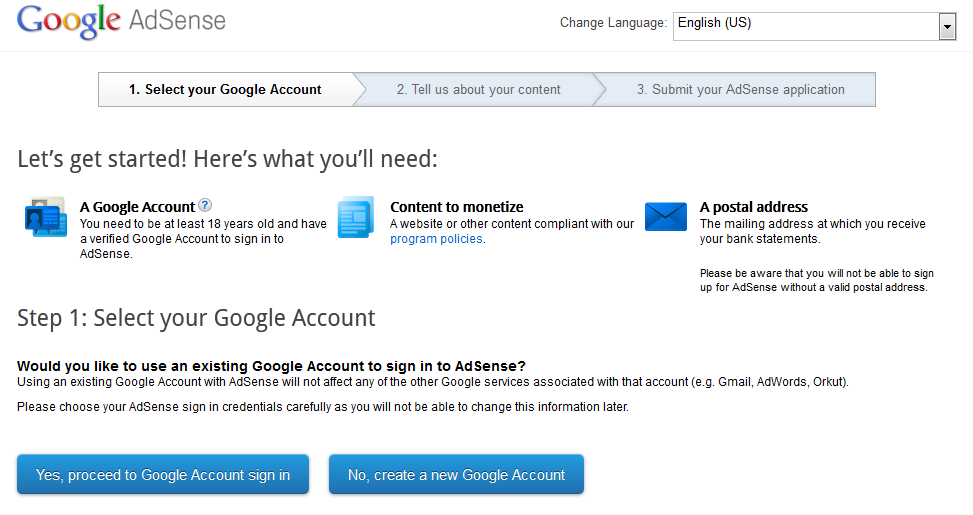
2. Apply Online
You can apply online to Google Adsense right here.  Here you will supply yourwebsite URLIndividual name or Business Entitycontact name (you if applying for yourself; could be someone different if you are applying as a business entity), mailing addressphone numberemail address, and perhaps one other basic bit of information.  You are not required to submit your TIN or bank account information at this stage yet.  This will happen after you get approved.
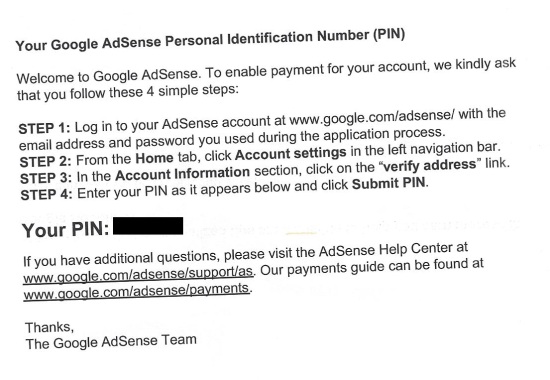
Make sure to give accurate phone and physical address information. You will be REQUIRED to verify your phone number and they will mail you a PIN to the address you supplied.  However, this does not occur until step 4.
The online application itself only take a few minutes to fill out.
3. Get Temporarily Approved and Place Ads
Approval usually occurs within 24 to 48 hours now.   If you follow my steps above for creating  a unique site that has never been involved with Google Adsense before, you should have no issues getting approved quickly.
At that point, you will receive an approval email from Google that explains the process.  Essentially you are “temporarily” approved until you meet other verification steps.
This means you can start placing ads on your site and you will see the clicks and revenue coming into your account.  Google is simply monitoring your activity to make sure you are not clicking your own ads or sending suspicious traffic.  As long as you leave your ads alone and don’t do anything suspicious – you should be fine.
In addition, you can also add the Google Adsense code to ANY of your other websites!  You don’t have to apply for each new site.  Once you have any approved account, you can use the same Adsense code on all your sites.
4. Getting Verified: Pin Verification, Bank Account and Tax Information, Phone Number
However, before you get paid, you need to verify a few things.  First, Google will send you a PIN verification in the mail.  This will come after a week to 10 days usually.
There is no rush, but at some point you will need to verify your bank account and submit your tax information.  The bank account must be in the same name that you applied with.  (So, if you applied with your business entity, the bank account must be for the business entity).
To get paid by ACH (the best way), you need to supply your bank account number and routing number.  Then Google will do a test deposit of a few cents.  You will then input this amount in your Google Adsense account to finish the verification.  Then you can start getting paid monthly!
You will also need to supply your TIN number and complete the necessary tax documents (this is all handled online by Google and only takes a couple of minutes).
If you haven’t previously verified your phone number, you will need to do so.  Google will place a test call with an automated code to you.  Input the code, and you are good to go!
5. Be Smart with Your Ads
Finally, be smart about how you handle your Adsense code.  Only put it on sites that meet the Google Adsense guidelines here.  Don’t click your own ads and NEVER ask anyone else to ever click your own ads!  This will get your account shut down.
Overall, stay in compliance with Google and enjoy the deposits coming to your account each month.

In Conclusion

These are the exact steps that I have used many times to get myself, my business entities, or the accounts of others approved to Google Adsense.  On the surface, they are fairly straightforward; but trust me, lots of people never get approved.
This could be for a number of reasons ranging from low quality content, to suspicious activity.  But if you follow the 5 steps that I’ve outlined here, you should get approved without any issues.
Have anything to add to the discussion?  I’d love to hear your thoughts below.

About Me (Universal TechWorld)

Be A Member For Regular Updates

 
Support : Privacy Policy | Terms of Service | Disclaimer
Copyright © 2015. Universal Mobile | Computer - All Rights Reserved
Template Created By Santosh Sahani Published By Universal Mobile and Computer
Proudly Powered By UMC | Copyright Policy